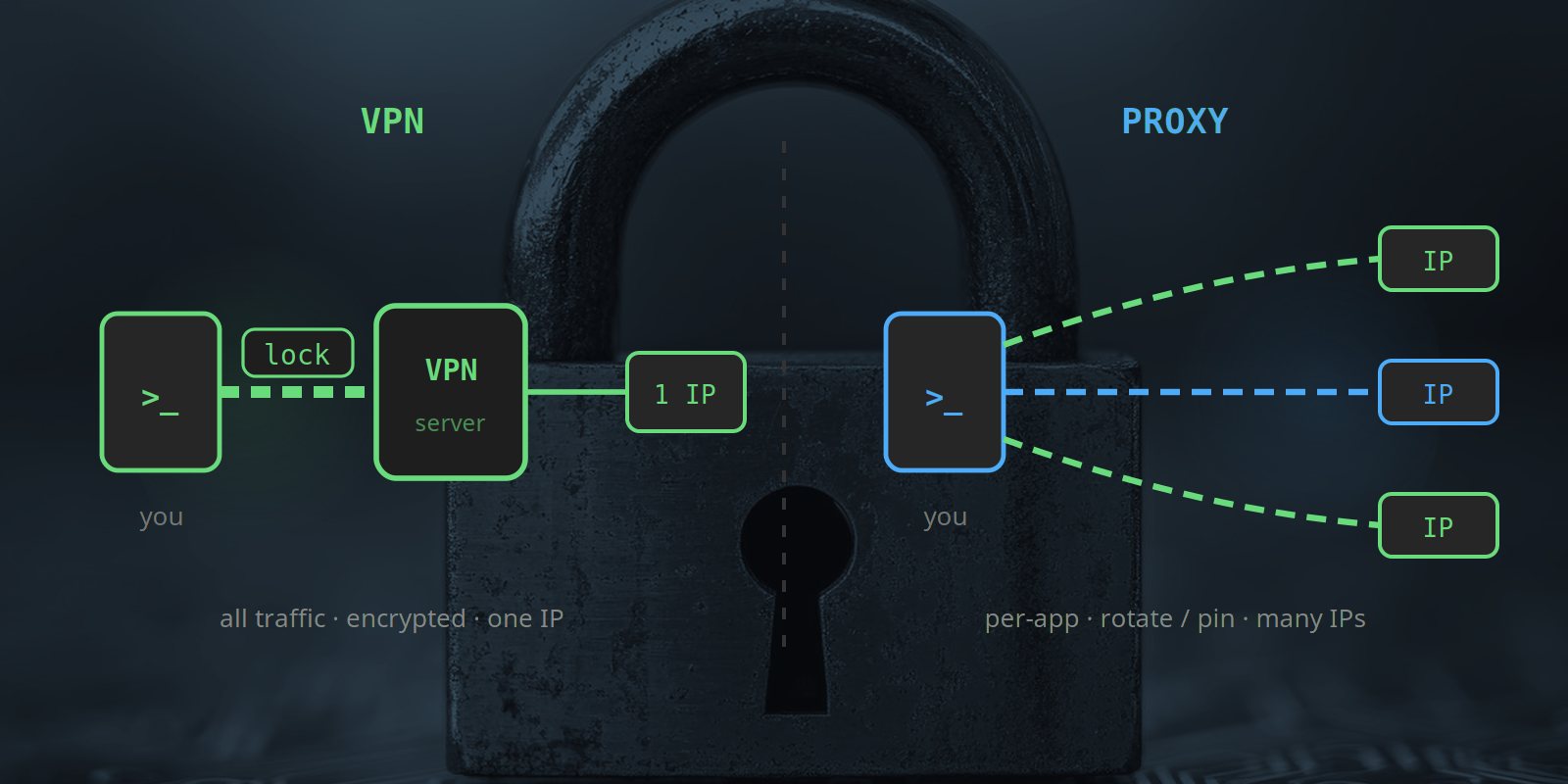
“Proxy” and “VPN” are used almost interchangeably in casual conversation, and they do share a basic trick: both hide your real IP by routing your traffic through an intermediary server. That is roughly where the similarity ends. Underneath, they operate at different network layers, encrypt different amounts of your traffic, and — most importantly — are built for fundamentally different jobs. Using the wrong one for your task is the difference between something that just works and something that gets your accounts banned or your data throttled.
This guide is deliberately neutral. Proxies are what we sell, but a VPN is genuinely the better tool for plenty of legitimate use cases, and pretending otherwise would be misleading. The goal is to give you a clear mental model so you can pick the right one for what you are actually trying to do.
What a VPN Actually Does
A VPN (Virtual Private Network) creates an encrypted tunnel that captures all of your device’s network traffic and sends it through a single VPN server, which then forwards it to the internet. It operates at the network layer — below your applications — so every app on your machine, from your browser to your email client to background OS updates, is wrapped in the tunnel automatically. You install a VPN app, hit connect, and your entire device now appears to the internet from the VPN server’s IP.
The defining properties are blanket encryption (everything is encrypted between you and the VPN server) and one exit IP (everything leaves from the same VPN server). That makes a VPN excellent for privacy and poor for tasks that need many distinct identities.
What a Proxy Actually Does
A proxy is an intermediary you configure per application (or per request), not system-wide. Your browser, your scraper, or your automation tool is told to send its traffic to the proxy, which forwards it to the target on your behalf. Proxies operate at the application layer (HTTP/HTTPS) or the session layer (SOCKS5), and they do not inherently encrypt your traffic the way a VPN does — encryption depends on the protocol the app itself uses (HTTPS stays encrypted end-to-end; plain HTTP stays plain).
The defining properties are per-app scope (only the apps you configure use it) and, crucially, the ability to provide many different IP addresses — rotating per request, or pinned per account. That makes a proxy excellent for tasks that need many identities and largely irrelevant for blanket privacy. For more on the proxy side specifically, see our introduction to mobile proxies.
The Core Differences, Side by Side
| VPN | Proxy | |
|---|---|---|
| Scope | Entire device (all apps, OS-level) | Per-app or per-request |
| Encryption | Always — the whole tunnel is encrypted | Optional — depends on the app’s own protocol (HTTPS yes, plain HTTP no) |
| Network layer | Network layer (L3) | Application (HTTP L7) or session (SOCKS5 L5) |
| Exit IPs | One — the single VPN server | Many — can rotate per request or pin per account |
| IP trust | Usually datacentre IPs (frequently flagged) | Varies by type — mobile/residential are high-trust |
| Overhead | Encrypts everything, so constant CPU/bandwidth cost | Lighter — only routed traffic, minimal overhead |
| Setup | A system app; one toggle | Per-app config (browser, scraper, script) |
When a VPN Is the Right Choice
For personal privacy and protection, a VPN is usually the better tool. Use one when:
- You want all your traffic encrypted, especially on untrusted networks like public Wi-Fi, hotel ethernet, or shared office connections. A VPN encrypts everything by default; a proxy does not.
- You want one identity for personal browsing — hiding your real IP from the sites you visit and your ISP, without needing to manage multiple identities.
- You want simplicity. One app, one toggle, your whole device is covered. No per-application configuration.
- Consumer geo-unblocking. For casual access to content licensed in another region, a VPN is the standard tool (though be aware major streaming services actively block known VPN IP ranges).
None of these use cases need more than one IP address, and all of them benefit from full encryption — which is exactly the combination a VPN is built for.
When a Proxy Is the Right Choice
A proxy wins whenever the task needs many IP addresses, or precise control over which traffic goes where. Use a proxy when:
- You are scraping or collecting data at scale. A single IP hammering a target gets rate-limited or blocked; rotating proxies spread the load across many addresses. See our web scraping guide.
- You manage multiple accounts. Agencies running several client profiles need each account on its own stable IP so platforms don’t see them as one operator. See managing multiple social accounts.
- You verify ads or check search rankings from a specific country. You need to see exactly what a UK user sees, from a UK IP — not from a VPN server that the target has already flagged. See our SEO monitoring and ad verification guides.
- You need protocol-level control — e.g. SOCKS5 to relay non-HTTP traffic, or per-request routing logic in a script.
- You need high-trust IPs. VPNs almost always use datacentre IPs, which anti-bot systems recognise and block. Mobile and residential proxies provide the carrier/ISP IPs that look like real users.
Why a VPN Can’t Substitute for a Proxy at Work
People often ask: “I already have a VPN — can’t I just use that for scraping / managing accounts / checking rankings?” The answer is no, for three structural reasons:
- One IP, not many. A VPN gives you a single exit address. Managing ten accounts through one VPN IP is exactly the “many accounts from one IP” pattern that gets them flagged — the VPN solves nothing. Proxies exist to give you many addresses.
- Datacentre IPs are low-trust. VPN servers live in datacentres, and their IP ranges are public knowledge. Anti-bot systems and ad platforms treat them as non-human infrastructure on sight. For trust-sensitive tasks you need residential or, best of all, mobile IPs.
- No per-request rotation. VPNs are designed to give you one stable, private connection — the opposite of rotating a fresh IP for each request. They are simply not built for multi-identity workloads.
Conversely, a proxy is a poor substitute for a VPN when your goal is blanket privacy: most proxies don’t encrypt, they only cover the apps you configure, and they are not designed to protect your whole device. The tools are complementary, not competing.
Where They Overlap (and How to Combine Them)
For casual “hide my IP while I browse” use, a VPN and a browser proxy both do the job, and a VPN is simpler and more private. That is the only real area of overlap, and the VPN rightly wins it. Outside that narrow case the tools diverge sharply: VPNs protect a single identity comprehensively; proxies let you operate many identities flexibly.
Because they solve different problems, many professionals use both — a VPN for general device privacy on untrusted networks, and a proxy for the specific work tasks (scraping, multi-account management, geo-verification) where a single encrypted tunnel is the wrong shape of tool. There is no need to choose one for life; choose the right one per task.
One Note on Mobile Proxies
If your task needs the highest-trust IP category available — genuine carrier IPs that are indistinguishable from a real smartphone — then neither a standard VPN nor a datacentre proxy will do. That is the specific niche mobile proxies fill: real UK SIMs on real devices, the IP class anti-fraud systems trust most. For an explanation of why that trust matters, see our introduction to mobile proxies and the mobile vs residential comparison.
Quick Decision Guide
| Choose a VPN if you… | Choose a proxy if you… |
|---|---|
| Want all your device’s traffic encrypted | Need many IP addresses, not one |
| Are protecting yourself on public/shared Wi-Fi | Are scraping, automating, or managing multiple accounts |
| Want one private identity for personal browsing | Need to appear accurately from a specific location (SEO, ad verification) |
| Want a single, set-and-forget toggle | Need high-trust (mobile/residential) IPs, or per-request rotation |
Summary
A VPN and a proxy both hide your IP, but they are built for opposite jobs. A VPN encrypts your entire device through one server — ideal for personal privacy and untrusted networks, useless for anything that needs multiple identities. A proxy routes specific apps through addresses you can rotate or pin — ideal for scraping, multi-account management, and accurate geo-verification, but not a substitute for whole-device encryption. Match the tool to the task: VPN for privacy, proxy for multiplicity. Get that right and you stop fighting your tools — and stop getting your accounts blocked for using the wrong one.
Decided a Proxy Is What You Need?
Test real UK mobile proxies — 500 MB free, no card required, with sticky sessions for multi-account work.
Start Free Trial