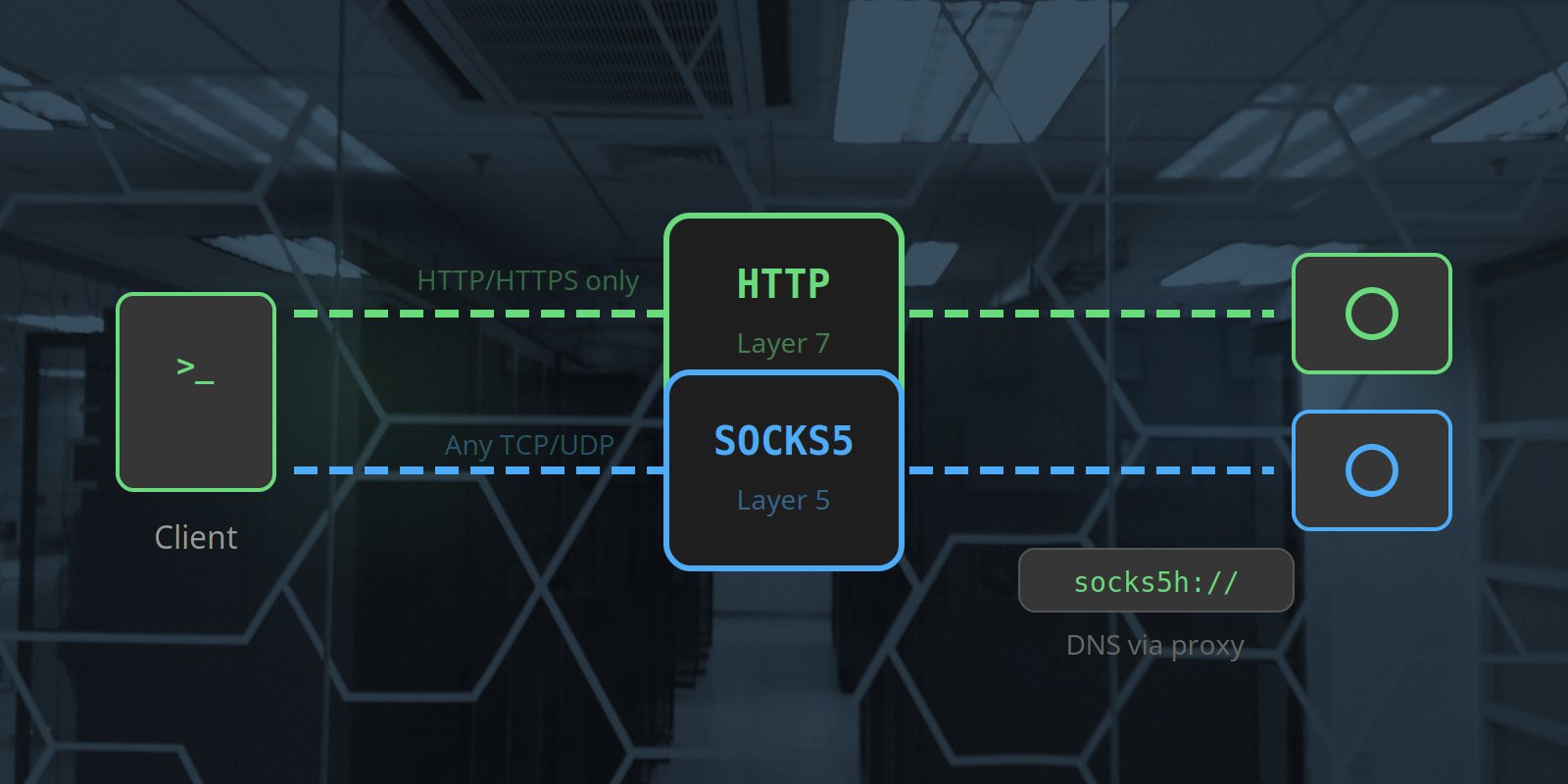
When you set up a proxy — whether for web scraping, social media management, or ad verification — you'll be asked to choose a protocol: HTTP or SOCKS5. Most tutorials just pick one and move on without explaining why.
That matters. The wrong choice can expose your real IP through DNS leaks, prevent certain tools from working at all, or add unnecessary overhead to your requests. This guide covers exactly how each protocol works, where each one excels, and which to reach for in specific scenarios.
The Short Answer
- SOCKS5 is the more capable, more flexible protocol. Use it as your default unless something forces you onto HTTP.
- HTTP proxy is simpler, natively supported by more tools, and perfectly adequate for standard HTTPS web scraping.
If you're configuring a proxy right now and need to move fast: use SOCKS5 with the socks5h:// scheme. Skip the rest of this article.
If you want to understand why — and know when to deviate — read on.
What Is an HTTP Proxy?
An HTTP proxy operates at the application layer (Layer 7 of the OSI model). It understands HTTP — it reads your request, interprets the headers, and forwards it to the target server on your behalf.
For plain HTTP requests (http://), the proxy fetches the page and returns it to you — it can optionally inspect or modify the content in transit.
For HTTPS requests (https://), the proxy uses a mechanism called HTTP CONNECT tunnelling: your client sends a CONNECT request asking the proxy to open a raw TCP tunnel to the destination, then your encrypted TLS session runs through that tunnel. The proxy can't see the content — it just forwards bytes.
What HTTP proxies handle well
- Standard HTTP and HTTPS web traffic
- Tools and libraries with native HTTP proxy support (
requests,curl,axios, browsers) - Scenarios where you want proxy-level caching or header injection (uncommon for scraping)
What HTTP proxies don't handle
- Non-HTTP protocols (WebSockets at the TCP level, FTP, custom TCP connections)
- UDP traffic
- DNS — by default, DNS resolution happens on the client side, not through the proxy. This means your real DNS server sees the hostnames you're resolving — a DNS leak even when your traffic goes through the proxy.
What Is a SOCKS5 Proxy?
SOCKS5 operates at the transport layer (Layer 5). It doesn't understand the content of your traffic at all — it simply relays raw TCP (and optionally UDP) packets between your client and the destination.
Because SOCKS5 is protocol-agnostic, it works with anything that runs over TCP or UDP: HTTP, HTTPS, WebSockets, SSH, custom protocols, database connections, and more. It doesn't inspect, modify, or interpret your traffic — it just forwards it.
SOCKS5 also adds two important capabilities over its predecessor (SOCKS4):
- Authentication — username/password auth at the proxy level (SOCKS4 had none)
- UDP support — SOCKS5 can relay UDP packets, not just TCP
The critical detail: socks5 vs socks5h
This is the most important technical distinction you need to know about SOCKS5:
| Scheme | DNS Resolution | Risk |
|---|---|---|
socks5:// | Client-side (your machine) | DNS leak — hostnames visible to your local DNS |
socks5h:// | Proxy-side (through the proxy) | No DNS leak — hostnames only visible to proxy |
Always use socks5h:// when privacy or accuracy matters. If you're using a UK mobile proxy to appear as a UK user, you want DNS resolving from the UK proxy side — not from your own machine's DNS server, which may be outside the UK entirely.
Head-to-Head Comparison
| Feature | HTTP Proxy | SOCKS5 Proxy |
|---|---|---|
| OSI layer | Layer 7 (Application) | Layer 5 (Session) |
| Protocol support | HTTP and HTTPS only | Any TCP/UDP protocol |
| DNS resolution | Client-side by default | Proxy-side (with socks5h) |
| DNS leak risk | Yes (for HTTP targets) | No (with socks5h) |
| UDP support | No | Yes |
| WebSocket support | Limited (via CONNECT) | Full |
| Authentication | Username/password | Username/password |
| Tool compatibility | Very broad (native in most libs) | Broad (may need extra package) |
| Overhead | Slightly higher (header parsing) | Lower (opaque forwarding) |
| Content inspection by proxy | Possible (for HTTP) | Never |
Protocol Choice by Use Case
Web scraping with Python requests
Use: SOCKS5 (socks5h://)
# Install: pip install requests[socks]

import requests

proxies = {
    "http":  "socks5h://aw_user:pass@proxy.simplyproxies.com:6890",
    "https": "socks5h://aw_user:pass@proxy.simplyproxies.com:6890",
}

r = requests.get("https://example.co.uk", proxies=proxies)
SOCKS5 prevents DNS leaks and doesn't modify your request headers — meaning your User-Agent and other headers reach the target exactly as you set them. HTTP proxies can add forwarding headers (X-Forwarded-For, Via) that reveal proxy usage; SOCKS5 never does.
Web scraping with Scrapy
Use: HTTP proxy (default) or SOCKS5 (with plugin)
Scrapy's built-in HttpProxyMiddleware only supports HTTP proxies natively. For SOCKS5, install scrapy-socks:
# settings.py — HTTP (native, no extra package)
DOWNLOADER_MIDDLEWARES = {
    "scrapy.downloadermiddlewares.httpproxy.HttpProxyMiddleware": 110,
}

# Set proxy via environment variable before running scrapy:
# export http_proxy=http://aw_user:pass@proxy.simplyproxies.com:6889
# Or per-request in your spider:
# meta={"proxy": "http://aw_user:pass@proxy.simplyproxies.com:6889"}

# settings.py — SOCKS5 (requires scrapy-socks)
DOWNLOADER_MIDDLEWARES = {
    "scrapy_socks.ProxySocks5Middleware": 750,
}
SOCKS5_PROXY = "socks5h://aw_user:pass@proxy.simplyproxies.com:6890"
For most Scrapy projects, HTTP is fine. Use SOCKS5 when scraping targets that check for proxy headers or if DNS accuracy matters.
Browser automation — Playwright
Use: SOCKS5
Playwright's proxy configuration accepts both, but SOCKS5 gives cleaner behaviour — no injected headers, full DNS proxying, and correct behaviour for WebSocket connections that modern web apps increasingly rely on:
from playwright.sync_api import sync_playwright

with sync_playwright() as p:
    browser = p.chromium.launch(
        proxy={
            "server":   "socks5://proxy.simplyproxies.com:6890",
            "username": "aw_user",
            "password": "pass",
        }
    )
    # Playwright handles socks5h DNS behaviour automatically
    page = browser.new_page()
    page.goto("https://example.co.uk")
Browser automation — Puppeteer (Node.js)
Use: HTTP proxy
Chrome does not support SOCKS5 username/password authentication — use HTTP proxy with page.authenticate() instead:
const puppeteer = require('puppeteer');

const browser = await puppeteer.launch({
    args: ['--proxy-server=http://proxy.simplyproxies.com:6889'],
});

const page = await browser.newPage();
await page.authenticate({ username: 'aw_user', password: 'pass' });
await page.goto('https://example.co.uk');
Anti-detect browsers (Multilogin, AdsPower, Dolphin Anty)
Use: HTTP proxy
Anti-detect browsers have mature, native HTTP proxy support with per-profile assignment. SOCKS5 is supported in most modern anti-detect browsers too, but HTTP is the path of least resistance and works reliably for social media management workflows.
curl from the command line
Both work. HTTP is marginally simpler:
# HTTP proxy
curl -x http://aw_user:pass@proxy.simplyproxies.com:6889 https://httpbin.org/ip

# SOCKS5 proxy (with remote DNS)
curl --socks5-hostname aw_user:pass@proxy.simplyproxies.com:6890 https://httpbin.org/ip
Note: --socks5-hostname is the curl equivalent of socks5h:// — it resolves DNS through the proxy. Use it.
WebSocket connections
Use: SOCKS5 — HTTP proxy will not work reliably
WebSocket connections start as an HTTP upgrade request but then switch to a persistent, bidirectional TCP connection. HTTP proxies handle the initial upgrade inconsistently — some drop the connection after the upgrade, others don't support it at all. SOCKS5, being protocol-agnostic at the TCP level, passes WebSocket traffic without any issues.
Non-HTTP protocols (SSH tunnelling, database connections, custom TCP)
Use: SOCKS5 — HTTP proxy cannot handle these at all
HTTP proxies only understand HTTP. For anything else — SSH, raw TCP, database protocols, custom application protocols — SOCKS5 is the only option. A correctly configured SOCKS5 proxy will forward any TCP connection regardless of what application-layer protocol runs over it.
Common Mistakes
Using socks5:// instead of socks5h://
The most frequent error. socks5:// resolves DNS on your client machine — meaning the target hostname is visible to your local DNS resolver, not routed through the UK mobile proxy. For geo-accurate results (especially for UK SERP monitoring or UK-targeted ad verification), always use socks5h://.
Using HTTP proxy and seeing X-Forwarded-For headers
Some HTTP proxy configurations inject X-Forwarded-For headers into outbound requests, revealing that you're using a proxy. Simply Proxies' HTTP proxy does not inject these headers, but if you're using a different proxy or a proxy management layer in front of it, check. With SOCKS5 this is structurally impossible — the proxy never touches application-layer headers.
Mixing proxy protocols mid-session
Pick one protocol per session and stick to it. Switching from HTTP to SOCKS5 mid-session (especially in browser-based tools) can cause session state inconsistencies. Reconfigure and restart the browser profile cleanly if you need to switch.
Using HTTP proxy for a tool that doesn't support CONNECT
Some older or simpler HTTP clients don't implement the CONNECT method — meaning they can do HTTP but not HTTPS through an HTTP proxy. If your tool silently fails on HTTPS targets while working on HTTP, this is the likely cause. Switch to SOCKS5, which doesn't require CONNECT at all.
Summary
HTTP proxies work at the application layer and understand HTTP. They're natively supported by nearly every library and tool, which makes them the path of least resistance for standard web scraping and most social media management workflows.
SOCKS5 proxies work at the transport layer and are protocol-agnostic. They support any TCP/UDP traffic, route DNS through the proxy when you use socks5h://, and never inject proxy-identifying headers into your requests. For most scraping and automation work, SOCKS5 is the better default.
The practical rule: use SOCKS5 unless your tool doesn't support it (reach for HTTP then), and always use socks5h:// not socks5:// to avoid DNS leaks.
Try UK Mobile Proxies — HTTP and SOCKS5
Get 500 MB free on Simply Proxies. Both protocols supported on all UK mobile connections.
Start Free Trial