
If you have used any proxy service, you have used one of two protocols: HTTP CONNECT or SOCKS5. They are everywhere because everything speaks them: curl, every browser, every anti-detect browser, every scraping library.
They are not the whole picture, though. Behind the two workhorses lives a family of protocols with names like Shadowsocks, Hysteria2, TUIC, REALITY, ShadowTLS, NaiveProxy, MASQUE and WebTunnel. Some are built to make proxy traffic hard to recognise. Some make UDP work through proxies. Some squeeze better speed out of bad mobile connections. This guide walks through them in plain language: what each one is for, how it works, and which one you should actually care about.
One note first: this is a technical tour, not an instruction manual for bypassing anything. Several of these protocols were invented to defeat internet censorship, and how they work is public knowledge documented by their own projects. What you do through any proxy, including ours, is governed by our Terms of Service.
The two you already know
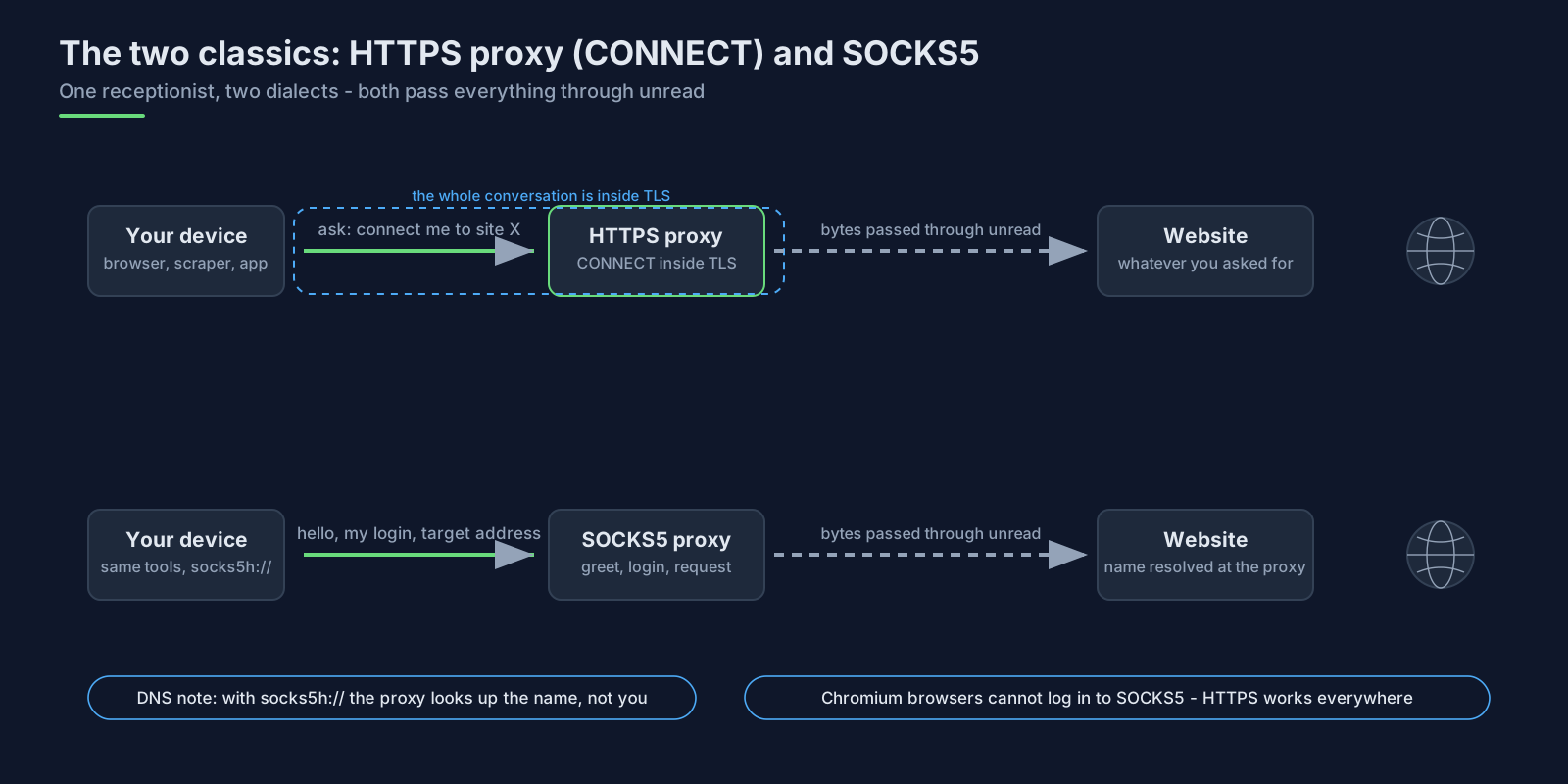
An HTTPS proxy works like a helpful receptionist. Your browser asks it, using the CONNECT command defined in the HTTP standard, to open a connection to some website. The proxy opens that connection, and from then on it just passes bytes back and forth without reading them. The whole conversation with the proxy happens inside a TLS encrypted tunnel, so your proxy username and password never cross the network in the clear. That is exactly how our HTTPS endpoint behaves.
SOCKS5 is an older, simpler standard that does the same job with less ceremony: a short greeting, an optional username and password exchange, and then the target website's address. Two details matter in practice. When you give it a website name instead of an IP address, the proxy looks up the address, not your computer, which is why the socks5h:// scheme is the right choice when DNS leaks matter (we captured what leaks and what does not in an earlier article). And support is uneven in surprising places: Chromium-based browsers cannot log in to a SOCKS5 proxy at all, which we verified all the way down to the browser's source code in that same article.
Everything else in this guide responds to two weaknesses the two classics share: the traffic has a recognisable shape, and everything runs over plain TCP.
Why the other protocols exist
Two problems drive almost all of the innovation.
The first is recognition. Tools that censor or monitor the internet often cannot read encrypted traffic, but they do not need to: the pattern of a proxy session (how big the messages are, how often they arrive, what the handshake looks like) gives it away. Much of the protocol zoo exists to break up that pattern, so proxy traffic looks like ordinary web browsing, a video call, or just meaningless noise.
The second is performance on bad networks. On a lossy mobile connection, TCP overcomes every lost packet by pausing the whole stream until it is repaired. QUIC, a newer transport that runs over UDP, fixes this by letting each stream inside a connection recover independently. A whole generation of proxy protocols has been built on top of it.
Shadowsocks: a SOCKS5 proxy in disguise
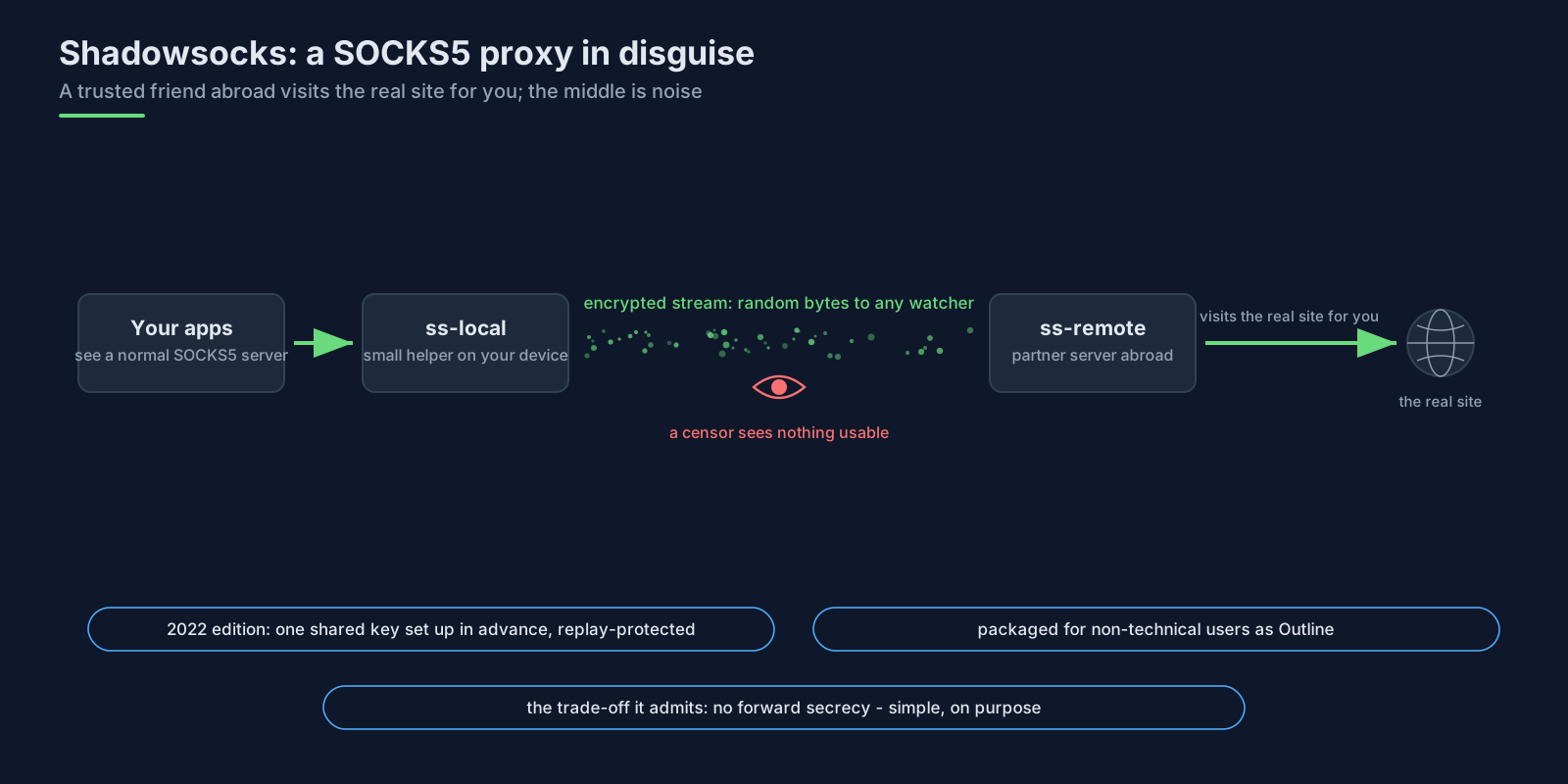
Shadowsocks is the oldest of the widely used alternatives, and the idea is simple. A small program on your computer pretends to be a normal SOCKS5 server, but instead of connecting anywhere directly it encrypts everything and forwards it to a partner program on a server abroad, which decrypts it and visits the real destination on your behalf. Anyone watching the middle sees encrypted noise rather than your traffic.
The current edition, Shadowsocks 2022, modernised the cryptography: both sides share one long random key in advance (no passwords to hash), every message carries protection against being recorded and replayed later, and the traffic is designed to be indistinguishable from random bytes, defeating systems that inspect traffic patterns. The specification is refreshingly honest about one trade-off: it does not provide forward secrecy (past traffic stays safe only as long as the shared key does), a deliberate choice for simplicity in its use case. Around the core sit standards for sharing server configs as links (SIP002), plugging in extra disguises (SIP003), and packaged distributions aimed at non-technical users, the best known being Outline, which wraps the idea in a personal VPN server anyone can run.
The QUIC generation: TUIC and Hysteria2
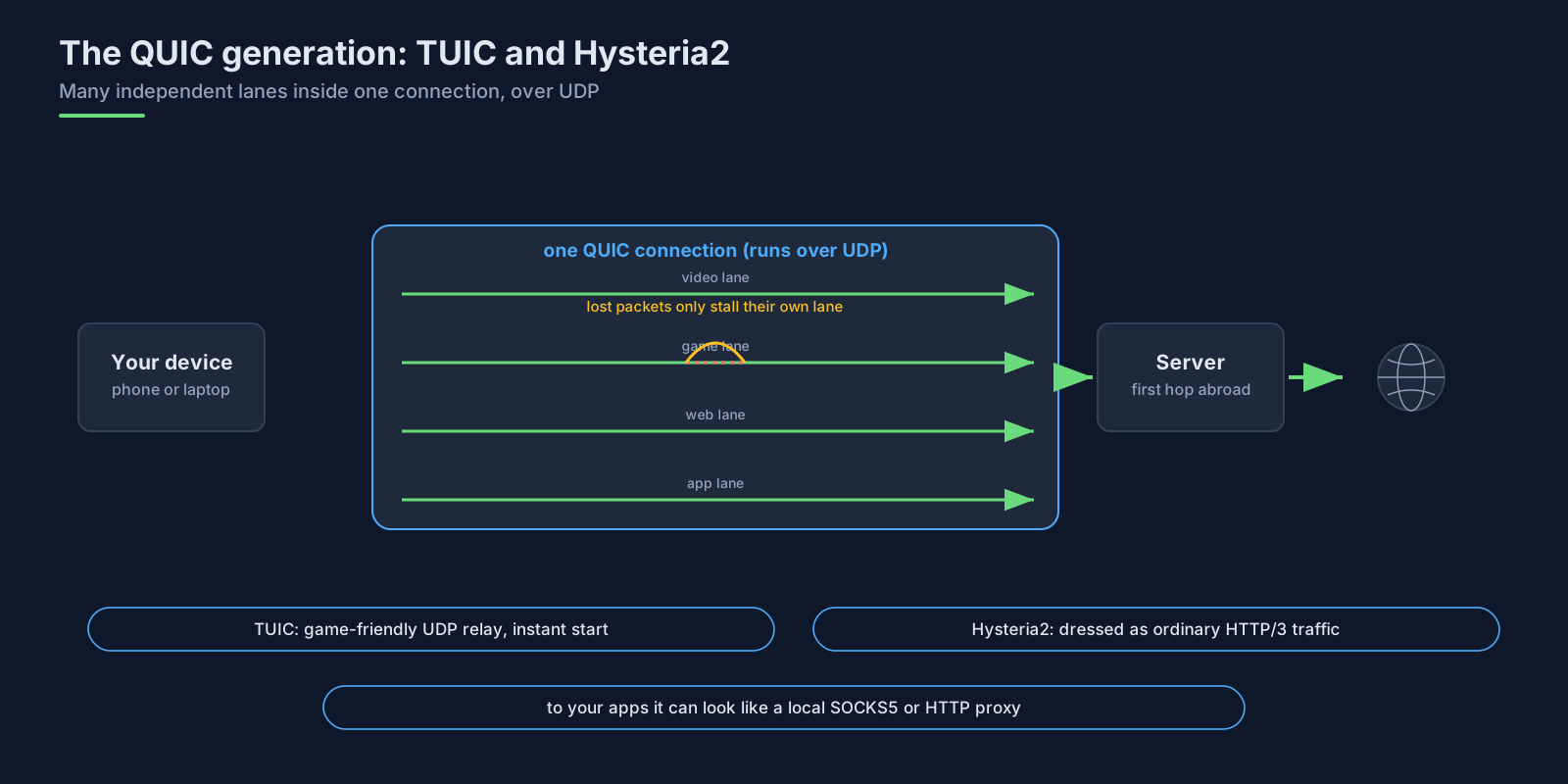
The QUIC-based protocols attack the speed problem. TUIC is a standardised proxy protocol that runs over QUIC and relays both TCP and UDP. Its feature list reads like a wish-list classic proxies cannot grant: connections start without waiting for handshakes to finish, UDP gets the "full cone" behaviour that voice and game clients expect (replies can come back from anywhere, not just one pinned address), and many streams share one connection, each recovering from packet loss on its own. It is supported by the popular multi-protocol clients: sing-box, mihomo, Surge and others.
Hysteria2 uses the same foundation and pushes speed harder with a customised version of QUIC built for unreliable networks. Its own description says it all: it disguises itself as ordinary HTTP/3 web traffic, and toward your own applications it can look like anything you need, a local SOCKS5 proxy, a local HTTP proxy, or a whole-device VPN.
The camouflage school: looking like an ordinary website
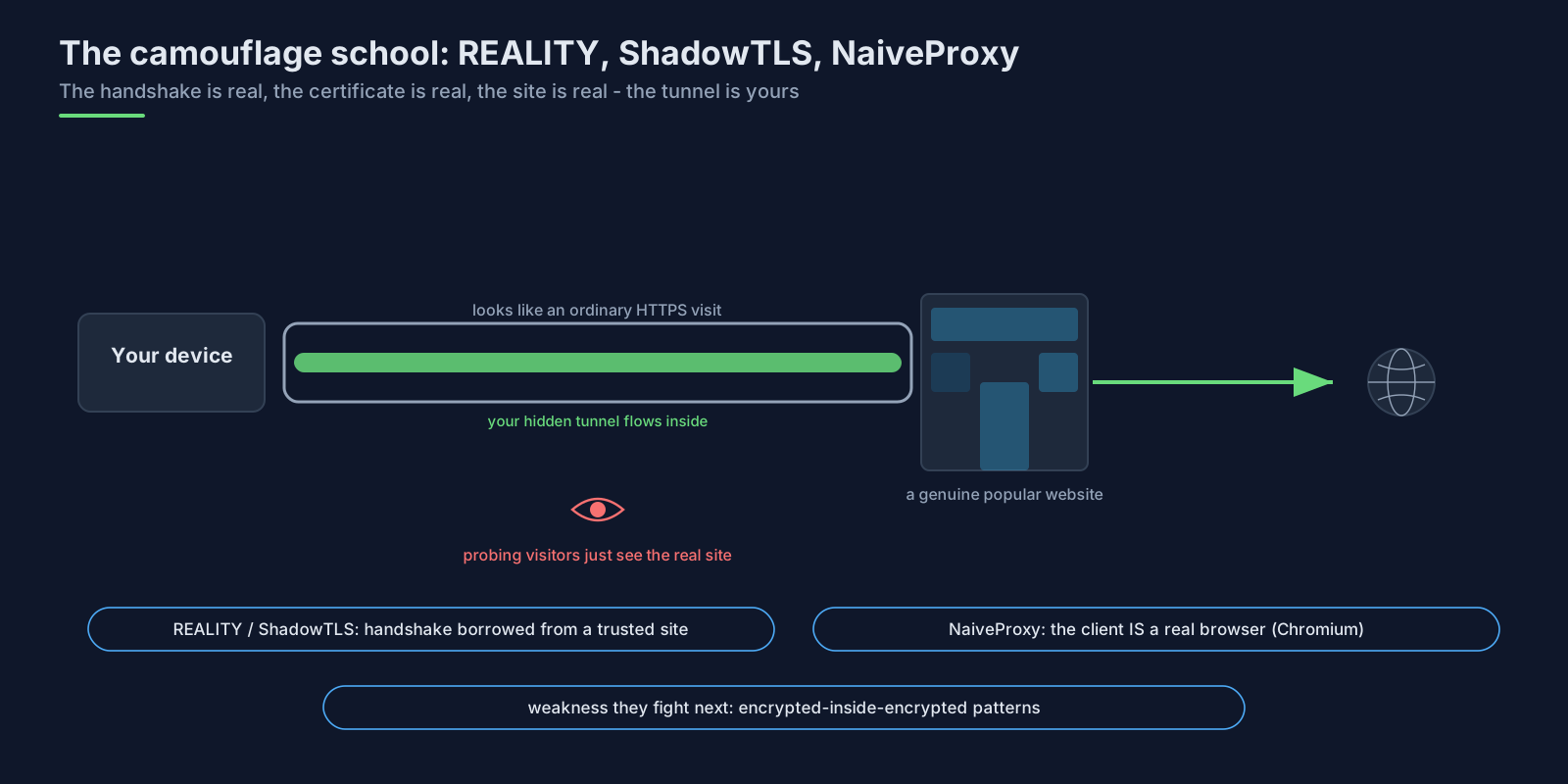
Another family answers the recognition problem differently: instead of looking like noise, look like the most boring traffic on the internet, an HTTPS session to a popular website.
The ancestor idea is Trojan: run your proxy inside a normal-looking HTTPS website, so a censor sees exactly what they would see if they visited the site themselves. The modern variants remove the last tell-tale, your own certificate. ShadowTLS performs a genuine TLS handshake using a valid certificate belonging to some other, trusted website; a watcher sees a real handshake with a real certificate chain, and a browser pointed at the server sees the real website. The actual proxy data flows after the handshake, which is why ShadowTLS is designed to wrap an encrypted proxy such as Shadowsocks rather than replace one.
REALITY, from the Xray project, goes further: the server borrows the entire TLS handshake of a real target website. No domain of your own, no certificate of your own, and anyone probing who fails the secret check is quietly forwarded to the real website they were trying to look at. Approved clients receive a temporary certificate minted for the occasion and present Chrome's exact TLS fingerprint when connecting. The project is candid about the remaining weakness of this whole school: an encrypted tunnel inside a TLS connection (TLS-in-TLS) has a recognisable shape of its own, which its XTLS Vision flow and the newer XHTTP transport are engineered to blur.
NaiveProxy takes a different route to the same goal: rather than imitating Chrome, it is Chrome. Its client is built from Chromium's actual network code, so its handshakes and pacing are identical to a real browser's, plus a padding layer that flattens the message-size patterns browsers normally produce. The server hides behind an ordinary website served by Caddy or HAProxy, so probing the address just reaches a real site.
MASQUE: the official standards-track version
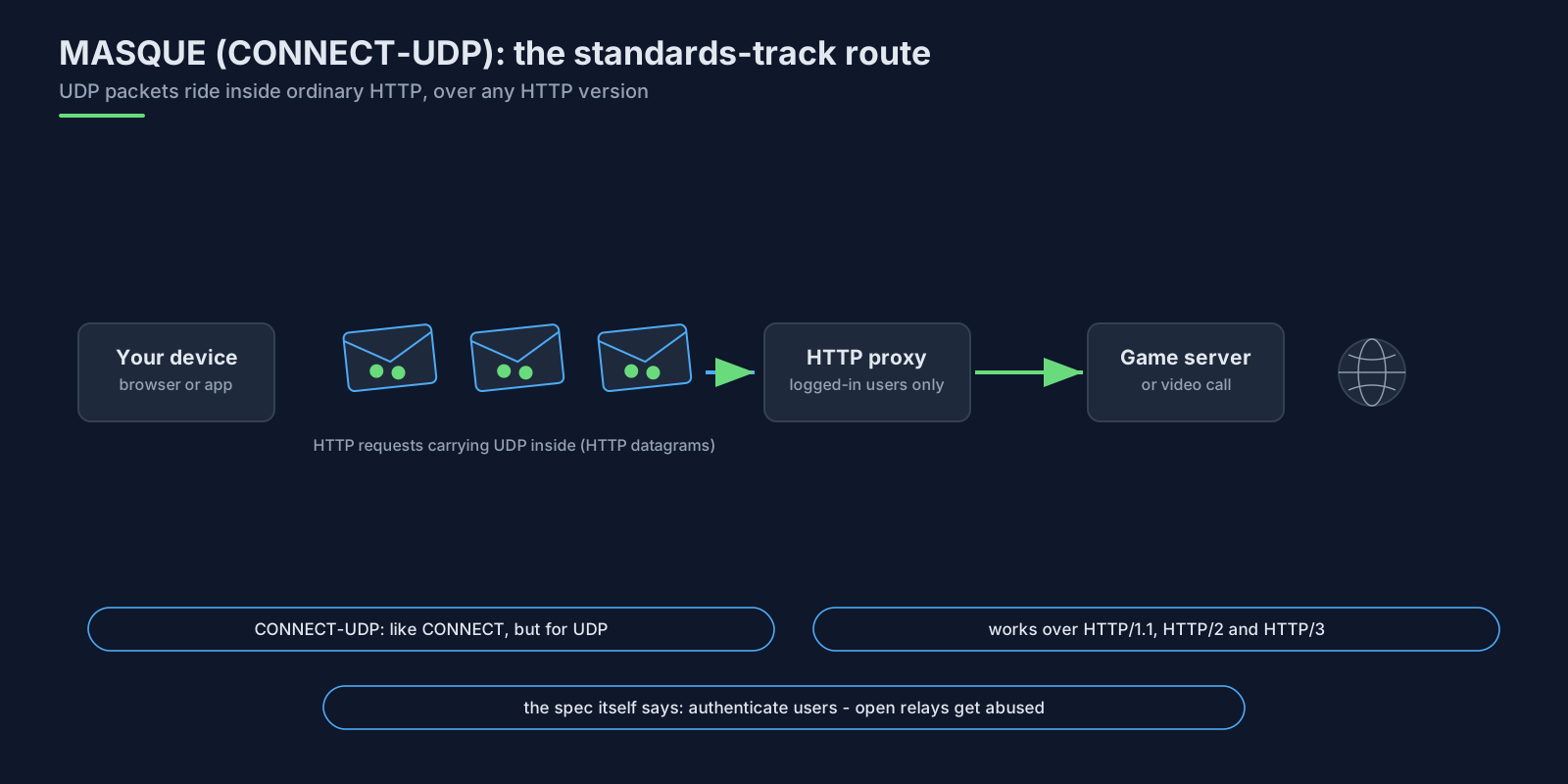
While the hobbyist ecosystem engineered cleverer disguises, the IETF standardised the same capability cleanly. RFC 9298 defines CONNECT-UDP: the official way to carry UDP through an HTTP proxy, as CONNECT does for TCP. The data rides inside "HTTP datagrams" (RFC 9297) and works over every version of HTTP, including HTTP/3. Apple's iCloud Private Relay already uses this MASQUE family to move traffic between its relay hops, as Cloudflare, which operates part of that relay network, describes: UDP proxying has arrived inside mainstream software, not just specialist tools.
Two details from its security discussion will sound familiar to anyone who runs a proxy service: the specification tells operators to allow only authenticated users, and it devotes a whole section to abuse and reflection risks, because an open UDP relay is a magnet for misuse. That is exactly why commercial proxies stay TCP-first and gate UDP behind authentication. A related standard, RFC 9484, extends the same design to full IP-level tunnels (CONNECT-IP), the building block for VPN-style remote access over plain HTTP.
WireGuard and the tunnel class
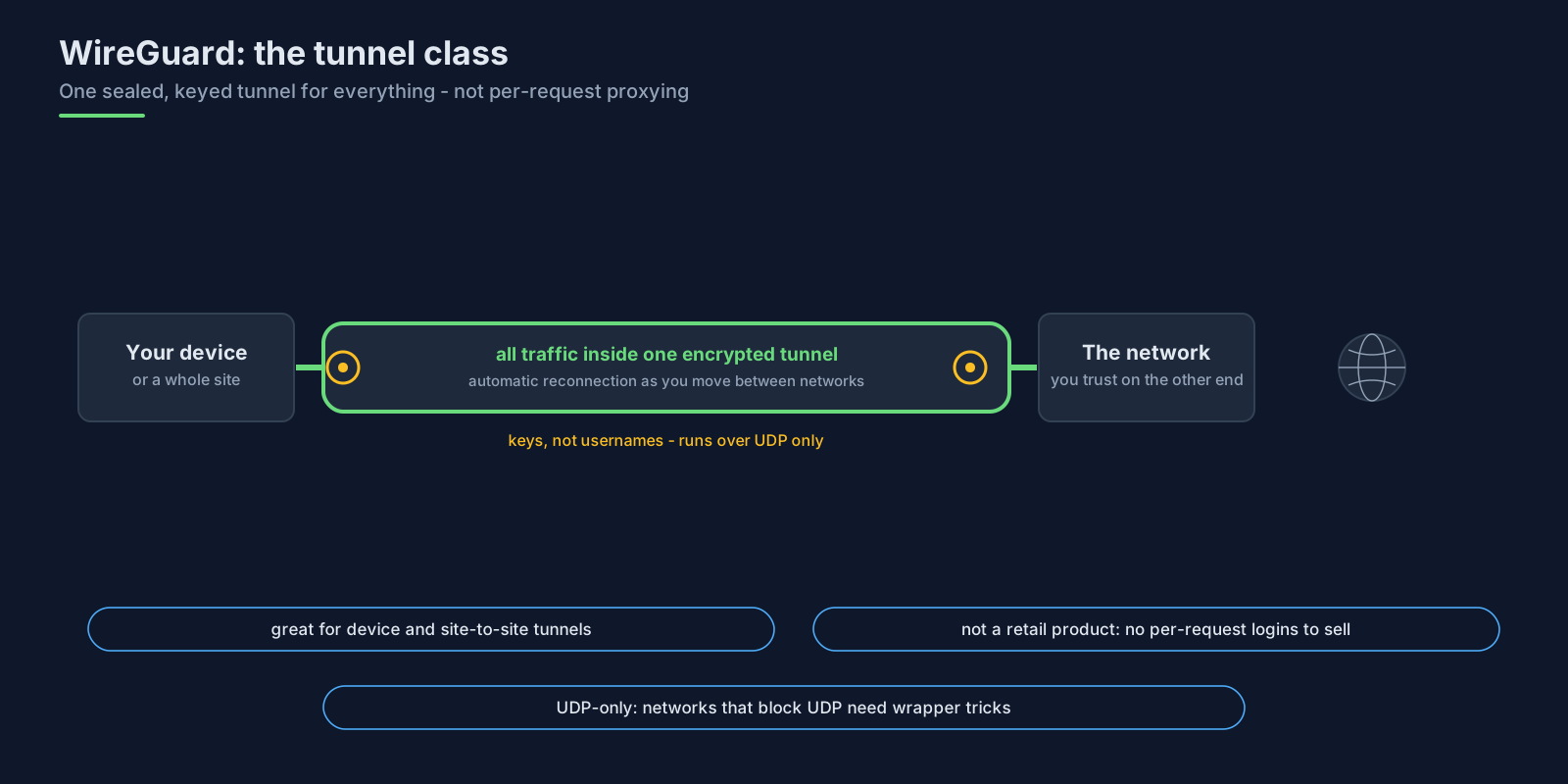
WireGuard belongs in this tour even though it is a VPN protocol rather than a proxy. It runs only over UDP, connects machines by cryptographic key rather than username and password, and is famously simple and fast: modern encryption, automatic reconnection as devices move between networks, and total silence to anyone who is not holding the right key.
That design is the opposite of what a shared proxy service needs. A proxy sells per-connection access with plain credentials, so a customer can use one login from any tool; a keyed tunnel has no concept of "one website request", and handing out tunnels would mean handing out network access rather than proxy exits. This is why the commercial proxy world's relationship with WireGuard is infrastructure rather than product: the tunnels move bytes behind the scenes, while customers keep authenticating per connection with SOCKS5 or HTTPS. And because WireGuard is UDP-only, environments that block UDP need wrappers to carry it inside TCP or HTTPS. Several projects exist for that; the best known, wstunnel, tunnels any TCP or UDP traffic through a WebSocket that looks like ordinary HTTPS and documents a ready-made recipe for wrapping WireGuard.
Tor's pluggable transports: the research frontier
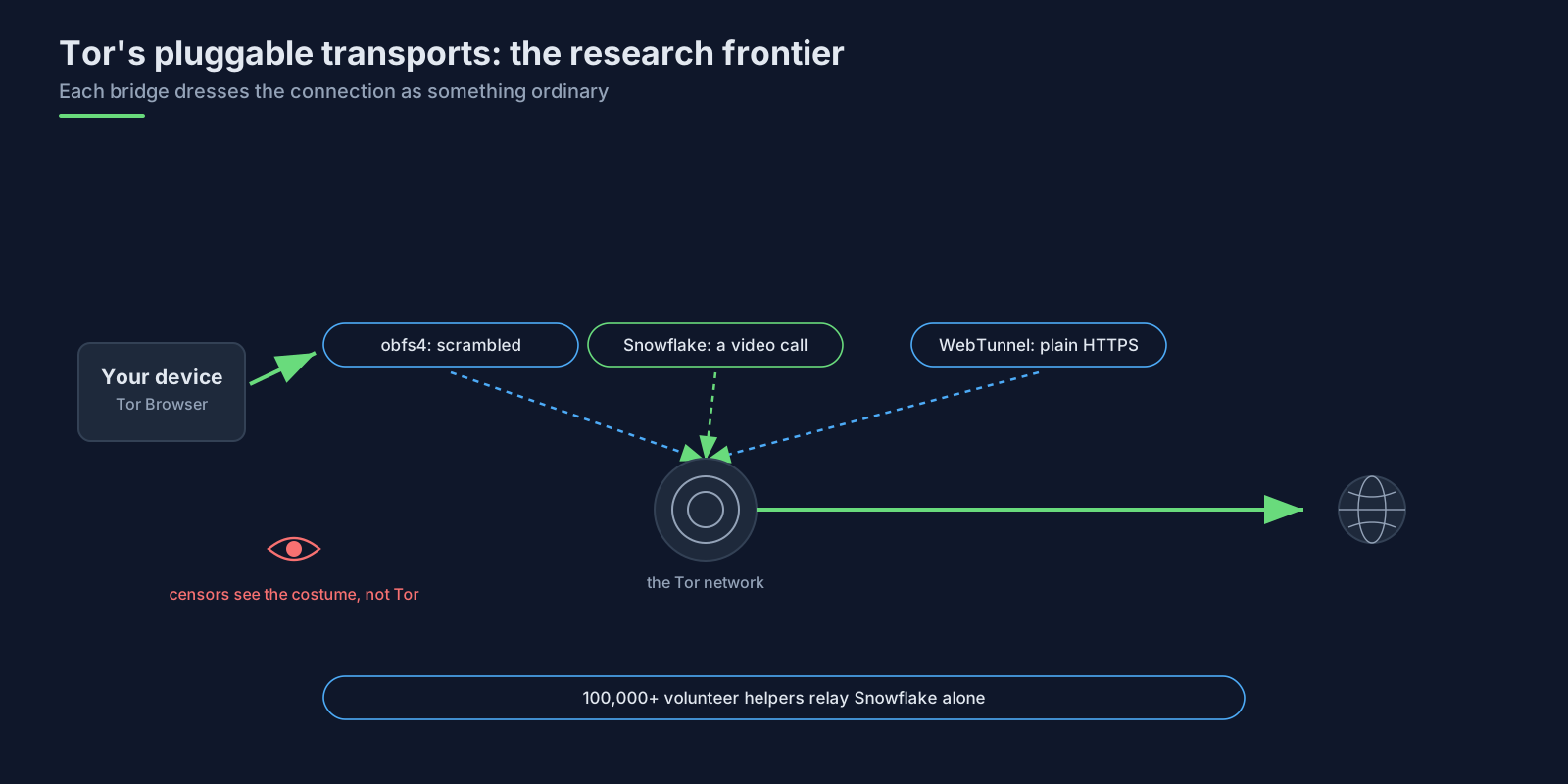
Tor has been running the longest research programme in traffic disguise, formalised as pluggable transports. The family includes obfs4, the long-standing scrambler; Snowflake, which routes connections through volunteers' browsers so the session looks like a video call (the project counts well over a hundred thousand volunteer helpers); meek, which makes Tor traffic resemble a connection to a big cloud provider; and WebTunnel, which disguises itself as a standard HTTPS connection. Even if you never touch Tor, this is where disguise techniques get published, measured and broken in the open, so it is worth reading.
So which protocol should you actually care about?
For most professional proxy users the honest answer is still the boring one: HTTP CONNECT and SOCKS5, and the reasoning matters more than the reflex.
Compatibility wins on the client side. Scrapers, anti-detect browsers and automation frameworks all speak the two standard protocols, and the specialists among them lean on the SOCKS5 side: in our field observations, heavy proxy users overwhelmingly drive their work through SOCKS5, frequently composing sticky sessions and network choices into the username exactly as our docs describe, and running it all through anti-detect browsers (we wrote a setup guide for the big three).
The newer protocols slot in cleanly anyway, because they meet you at the local edge. Hysteria2 can expose a local SOCKS5 port; TUIC clients like sing-box and mihomo expose local SOCKS and HTTP ports; NaiveProxy's client likewise presents a local SOCKS5 listener. In other words, the newer protocol is a transport between you and a first hop that you control, and the tooling at that hop still hands your applications the two standard interfaces. If you then want the whole device covered, tun2socks turns any local SOCKS5 input into a device-wide VPN, which is exactly the technique from our first VPN article and its kill-switch sequel.
On the exit side, the standard protocols win for a structural reason: per-connection authentication with plain credentials is what makes a shared, rotating proxy pool practical to sell, measure and keep safe. The IETF's own security discussion for CONNECT-UDP reads like a proxy operator's incident log.
So the realistic decision table looks like this:
| Protocol | What it runs over | How you log in | UDP? | Best for |
|---|---|---|---|---|
| HTTP CONNECT | TCP inside TLS | username and password | no | universal client support |
| SOCKS5 | TCP | username and password | rarely in practice | scrapers, anti-detect browsers, automation |
| Shadowsocks 2022 | TCP and UDP | shared secret key | yes | self-hosted, pattern-resistant tunnels |
| TUIC | QUIC | UUID and password | yes, game-friendly | UDP-heavy apps on bad networks |
| Hysteria2 | customised QUIC | configurable | yes | speed on lossy links, looks like HTTP/3 |
| VLESS + REALITY | TCP with a borrowed real handshake | UUID plus secret check | via inner protocol | self-hosting under censorship |
| ShadowTLS | TCP, handshake borrowed from a chosen site | delegated to inner proxy | via inner proxy | a wrapper around Shadowsocks |
| NaiveProxy | HTTP/2 or HTTP/3 CONNECT | username and password | no | maximum camouflage, real Chrome behaviour |
| MASQUE CONNECT-UDP | HTTP/1.1, 2 or 3 | operator-defined | yes, the whole point | standards-track UDP proxying |
| WireGuard | UDP | cryptographic keys | n/a (tunnel) | device and site-to-site tunnels |
| Tor bridges (obfs4, Snowflake, WebTunnel) | varies | per bridge type | n/a (onion routing) | anonymity under censorship |
What this means for Simply Proxies users
Our product surface is deliberately the standard half of this article: an HTTPS endpoint that speaks TLS-wrapped CONNECT and a SOCKS5 endpoint over TCP, both documented in our docs. Everything our earlier articles measured follows from that: website names resolve at the exit with socks5h://, Chromium cannot log in to SOCKS5, and QUIC does not survive being proxied, so HTTP/3 traffic falls back to HTTP/2 inside the tunnel. We do not relay UDP, and we say so plainly.
The newer protocols still touch your setup in two honest ways. If you front your work with a local sing-box, Hysteria2 or similar client of your own, point its final hop at a standard proxy and it will present you the same SOCKS5 and HTTP interfaces you already use. And if your goal is a device-wide tunnel rather than per-app proxying, the tun2socks route in our VPN articles needs nothing fancier than SOCKS5 on the input side.
Choose the newer protocols for the path you control, and the standard protocols for the path you buy.
Last verified 2026-11-17.
Try It With Real UK Mobile IPs
Run the examples in this guide through genuine UK 4G/5G exits. 500 MB free, no card required.
Start Free Trial